Introduction
When I first started building my portfolio website, I thought of it as a simple no-code project.
The goal was straightforward: create a place to showcase my work while building and maintaining the entire experience independently.
What I didn't expect was how quickly the project would evolve into something much bigger.
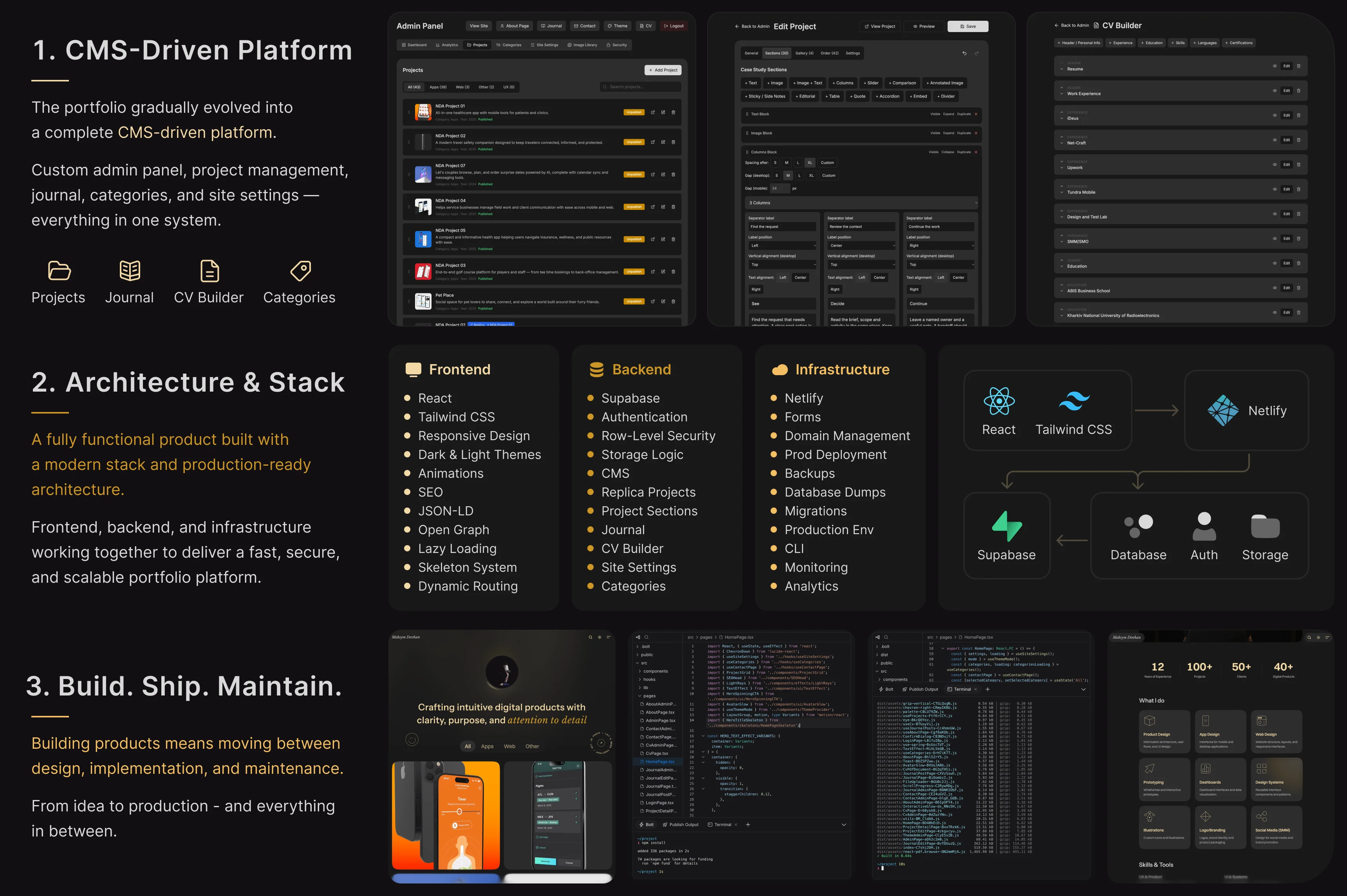
Over roughly six months, it evolved into a production-ready platform with its own CMS, database, authentication, analytics, deployment pipeline, and long-term maintenance requirements.
From Designer to Product Builder
The biggest shift wasn’t learning new tools – it was changing how I think about building products.
Instead of focusing only on screens and user flows, I started thinking about:
product structure
data relationships
content architecture
edge cases
scalability
deployment
long-term maintenance
The project pushed me beyond interface design and gave me a much broader understanding of how digital products are structured, deployed, and maintained.
Along the way, I also became responsible for decisions that traditionally fall outside a designer's role – structuring data, organizing content workflows, maintaining production environments, troubleshooting regressions, and balancing product quality with implementation constraints. Those responsibilities gradually became just as important as designing the interface itself.
[IMAGE]
Beyond No-Code
At some point, I stopped calling this project a no-code website.
It had become a fully functional product that required decisions far beyond interface design.
I was no longer simply building a website. I was maintaining a product with its own architecture, content workflows, and production environment.
Behind the public-facing experience was a growing system of interconnected product, content, and infrastructure layers.
Under the Hood
Although the public website intentionally appears simple, the work behind it extends far beyond what visitors see.
Throughout development, it evolved into a production-ready platform that required balancing product design, technical implementation, content management, performance, security, access control, deployment, and long-term maintenance.
During development, I had to design and maintain systems across several interconnected areas:
Content Management
Project CMS
Journal CMS
CV Builder
Category Management
Site Settings
Rich Text Editor
Image Management
Case Study Builder
Reorderable project content blocks
Rich text and reusable media sections
Section visibility and layout controls
Embedded prototypes and media
Data Architecture
Relational database architecture
Project relationships
Replica projects and linked content
Stable section identifiers
Reusable and reorderable content sections
Flexible Project Detail composition
Media organization
Security
Authentication
Role-based access control
Row-Level Security
Protected admin area
Private media storage
Signed media URLs
Password-protected case studies
Server-side access validation
Production security audits and privilege hardening
Single-admin authorization across CMS and Storage
Performance
Lazy loading
Skeleton loading
Image optimization
Media preview and delivery optimization
Browser, CDN and signed-media caching
Persistent signed media URL reuse
Private media delivery optimization
Background revalidation
Storage egress monitoring and optimization
Production code cleanup
Lighthouse optimization
Runtime animation and rendering optimization
User Experience
Responsive layouts
Theme synchronization
Motion refinement
Keyboard navigation, focus management, and accessible controls
Loading states
Interaction consistency
Analytics & Privacy
Consent-based analytics
Custom analytics dashboard
Content and engagement tracking
Privacy-aware event collection
Analytics reporting through a secure server-side API
Production
Deployment
Database migrations
Database, Storage, configuration backups, and disaster-recovery planning
Production debugging
SEO, structured data, sitemap generation, and indexability controls
Regression testing and prevention
Runtime traffic and storage monitoring
Analytics monitoring and production validation
Cross-browser rendering and print debugging
Technology Stack
While the responsibilities above describe what had to be designed and maintained, the project was implemented using the following technology stack:
Frontend
React
TypeScript
Tailwind CSS
Vite
React Router
Motion
React PDF
Backend
Supabase
PostgreSQL
Authentication
Row-Level Security (RLS)
Storage
Infrastructure
Netlify
Cloudflare Workers
PostHog
GitHub
Domain & DNS Management
Database Migrations
Production Deployments
[IMAGE]
What No-Code Doesn’t Replace
No-code tools make building software more accessible, but they don’t replace:
product thinking
problem solving
information architecture
understanding business goals
prioritization
making trade-offs
maintaining production systems
Good tools don't compensate for weak product decisions.
The tools can accelerate delivery, but they don’t eliminate complexity.
The Case Study Builder became a modular system, but its layout controls remained intentionally constrained to maintain consistency. Private media required a different balance: access validation and signed URLs had to work alongside caching to avoid unnecessary requests.
These decisions taught me to balance flexibility, security, performance, and maintainability rather than focusing only on implementing features.
AI as a Development Partner
This project wasn’t built by AI. It was built with AI.
Modern language models significantly accelerated implementation, debugging, research, and experimentation. They helped me explore solutions faster, understand unfamiliar technical concepts, identify potential issues, and iterate across both design and development.
However, every architectural decision, product trade-off, UX refinement, and production validation still required human judgment.
Generated solutions also had to be reviewed, tested, adjusted, and sometimes rolled back when they introduced regressions or conflicted with the existing system.
In practice, this often meant validating assumptions before implementation, inspecting production behavior, narrowing problems through controlled experiments, and stopping proposed solutions when the underlying architecture had not yet been verified.
AI became a powerful engineering partner–not a replacement for product thinking, responsibility, or quality control.
Polishing Never Ends
One thing I underestimated was how much time goes into refinement after a product is already "finished."
Most of the recent work wasn't about adding new features.
It was about improving the overall experience through dozens of small production refinements:
eliminating visual flicker
improving loading behavior
refining responsive breakpoints
synchronizing theme behavior
polishing interactions and transitions
reducing unnecessary loading states
making the interface feel more consistent
improving private media caching and delivery
eliminating browser-specific rendering issues
making case study layouts more flexible without rebuilding templates
Many of these improvements required revisiting existing solutions several times. In some cases, seemingly minor visual refinements exposed broader issues that had to be resolved across desktop, tablet, and mobile experiences.
Some refinements also exposed deeper architectural issues. Improving private media delivery, for example, required tracing signed URL lifecycles across catalog pages, project details, admin tools, browser cache, and CDN behavior. A seemingly simple performance issue eventually led to a more consistent media reuse strategy across the entire product.
The final acceptance phase also uncovered issues that earlier tests hadn't caught: admin editor routes accessible to guests and missing pages returning HTTP 200. Both were fixed and verified in production.
It reinforced an important lesson: a working interface and successful builds don't necessarily mean a production release is ready.
Hundreds of Small Decisions
One of the biggest surprises wasn’t building new features.
It was the number of small decisions required to make everything feel coherent.
Spacing. Typography. Loading behavior. Animation timing. Responsive layouts. Hover states. Theme synchronization. Navigation consistency.
None of these decisions is especially difficult in isolation. Together, however, they define how polished and intentional a product feels.
The Part Nobody Sees
Most visitors will never notice the majority of the work behind a polished product.
They won’t see production fixes, responsive adjustments across breakpoints, accessibility improvements, performance tuning, caching strategies, private media delivery, access-control logic, deployment issues, security configuration, CMS architecture, database migrations, or SEO refinements.
Some of the most important work involved making systems invisible: ensuring private media remained secure without being repeatedly downloaded, allowing case studies to become more flexible without breaking existing projects, and resolving browser-specific rendering issues that users should never have to notice.
Some of the most consequential fixes were completely invisible – from tightening production permissions and recovery procedures to preventing duplicate requests and making failure states safer.
Ironically, that is often the goal.
The better these systems work, the less users have to think about them. They simply experience a product that feels stable, fast, and coherent.
[IMAGE]
Lessons Learned
The most important lesson from this project is that the line between design and development is becoming increasingly blurred.
As designers, we now have the opportunity to participate in much larger parts of the product lifecycle – from the initial idea to production and maintenance.
That doesn't replace software engineering expertise.
But it does make us better product builders.
[IMAGE]
Conclusion
This project started as a simple portfolio website.
Hundreds of hours later, it became something entirely different: a product that taught me how closely design, technology, and product thinking are connected.
The biggest takeaway wasn't mastering another tool or framework. It was learning that building a product doesn't end with shipping the first version. Much of the most demanding work begins afterwards – maintaining quality, refining countless small details, solving unexpected problems, and continuously improving the experience. Looking back, that's where the most valuable learning happened.